
Download Password Zipper – Secure, Free ZIP Encryption Tool for Windows & Mac
Why Password Zipper Is the Go‑to Solution for File Security
In an era where data breaches make headlines on a daily basis, safeguarding sensitive information has become a non‑negotiable priority for both businesses and private users. Password Zipper answers that call by turning ordinary ZIP and RAR archives into fortified containers that can only be opened with a password you set. The application’s lightweight footprint—just 592.5 KB—means it runs effortlessly on any modern computer without hogging RAM or CPU cycles. Whether you are a freelance designer needing to share client assets, an HR manager protecting employee records, or a student who wants to keep research notes private, Password Zipper offers an additional layer of encryption that integrates seamlessly with the file‑compression tools you already use.
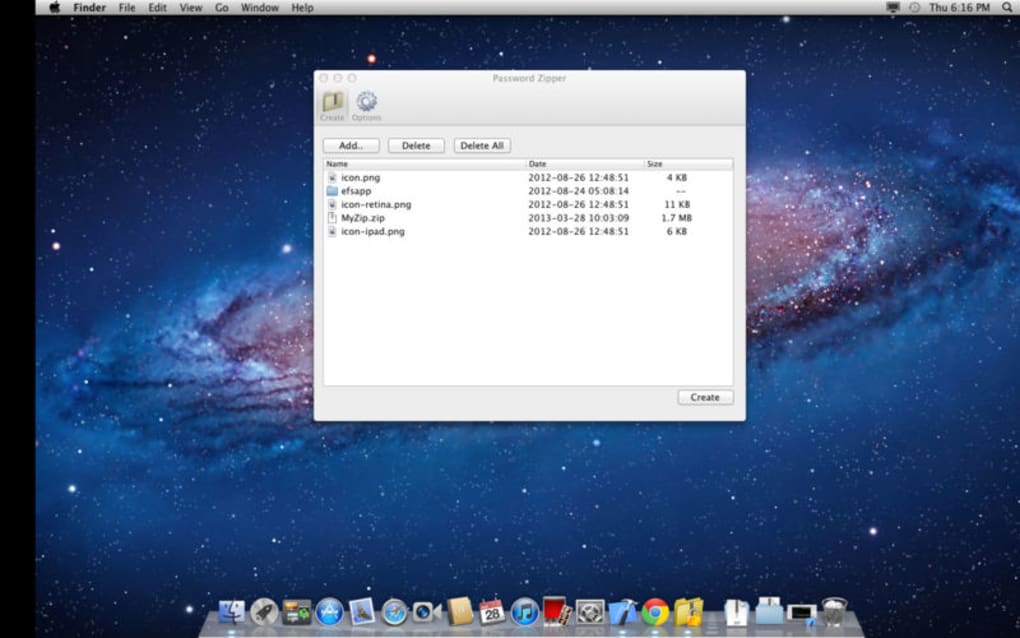
What sets Password Zipper apart is its reliance on 256‑bit AES encryption, a standard adopted by Fortune‑500 corporations and government agencies alike. This level of cryptography ensures that even if a malicious actor intercepts your archive, the data inside remains indecipherable without the correct password. The intuitive dashboard eliminates the learning curve—no prior knowledge of cryptography is required. You simply drag a file onto the interface, type a password, and the software generates a new, encrypted archive ready for safe distribution or storage.
Beyond the core security functions, Password Zipper is designed with real‑world workflows in mind. It supports both ZIP and RAR formats, so you don’t have to juggle multiple utilities. The program also includes a quick “copy‑to‑clipboard” feature for passwords, reducing the chance of typographical errors when sharing credentials with colleagues. All these capabilities are offered in a free version that does not impose hidden fees, ads, or mandatory registrations—making it an ideal choice for users who demand both privacy and simplicity.
Key Features That Make Password Zipper Stand Out
- 256‑Bit AES Encryption: Industry‑grade security that meets corporate compliance standards.
- Dual Format Support: Works with both ZIP and RAR archives, eliminating the need for extra conversion tools.
- Lightweight Design: Requires only 592.5 KB of disk space and minimal system resources.
- Intuitive Dashboard: Drag‑and‑drop interface with real‑time password strength meter.
- Password Management Helpers: One‑click copy to clipboard and optional password generator.
- Batch Processing: Encrypt multiple files simultaneously to save time on large projects.
- Cross‑Platform Compatibility: Native installers for Windows 10/11 and macOS Catalina and later.
- Secure Deletion Option: Permanently erase original unencrypted files after successful encryption.
- Automatic Updates: Built‑in updater ensures you always have the latest security patches.
- Free Forever License: No subscription, no hidden charges—full functionality at zero cost.
Step‑by‑Step Installation and How to Encrypt Your First Archive
Getting started with Password Zipper is a breeze. Follow these simple steps to download, install, and begin encrypting your files:
- Download the Installer: Visit the official Password Zipper website and click the “Download for Windows” or “Download for macOS” button. The installer is a signed executable (Windows) or a .dmg package (macOS) that ensures a secure, tamper‑free download.
- Run the Installer: On Windows, double‑click the .exe file and follow the on‑screen prompts. macOS users should open the .dmg, drag the Password Zipper icon into the Applications folder, and confirm any security prompts from Gatekeeper.
- Launch the Application: After installation, open Password Zipper from the Start Menu (Windows) or Launchpad (macOS). The first launch may ask for permission to access your Documents folder—grant it to enable file selection.
- Select a File or Folder: Drag the ZIP or RAR archive you wish to protect onto the central dashboard. You can also click the “Browse” button to locate files manually.
- Set a Strong Password: Enter your desired password in the “Create Password” field. The built‑in strength meter will guide you toward a robust combination of letters, numbers, and symbols. For added convenience, click “Generate” to let the app create a random, high‑entropy password.
- Choose Encryption Options: By default, Password Zipper applies 256‑bit AES encryption. If you need to comply with a specific policy, you can toggle the “Secure Deletion” option to erase the original unencrypted file after successful encryption.
- Start Encryption: Press the “Encrypt” button. The software creates a new file with the same name followed by “_protected.zip” (or .rar). A progress bar shows the status, and a notification appears when the process completes.
- Distribute or Store Securely: Share the encrypted archive via email, cloud storage, or USB drives. Remember to transmit the password through a separate channel (e.g., a phone call or a secure messaging app).
The entire workflow typically takes less than a second for files under 100 MB, and even large archives (several gigabytes) are processed efficiently thanks to the program’s optimized encryption engine. Should you encounter any issues, the “Help” menu provides links to a detailed online knowledge base and a contact form for direct support.
System Compatibility, Pros & Cons, and Frequently Asked Questions
Supported Operating Systems
Password Zipper is built to run natively on the most widely used desktop platforms:
- Windows 10, Windows 11 (64‑bit)
- macOS Catalina (10.15) and later (Intel & Apple Silicon)
The application leverages native APIs for file handling and encryption, guaranteeing stable performance across both Windows and macOS ecosystems. While there is currently no dedicated mobile version, the encrypted archives can be opened on any device that supports standard ZIP/RAR extraction tools—provided the correct password is supplied.
Pros and Cons
Pros
- Robust 256‑bit AES encryption trusted by enterprises.
- Lightweight installer (< 1 MB) leaves ample system resources free.
- Supports both ZIP and RAR, covering most user scenarios.
- Free forever with no hidden ads or trial limitations.
- Batch processing saves time on large projects.
- Automatic updates keep security patches current.
- Secure deletion ensures no residual unencrypted data remains.
Cons
- No native Linux version (though archives can be opened with third‑party tools).
- Lacks advanced key‑management features found in enterprise DLP suites.
- GUI is simple, which may feel limited for power users seeking scripting capabilities.
- Only one password per archive; no multi‑user or role‑based access controls.
FAQ – Your Password Zipper Questions Answered
Is Password Zipper truly free, or are there hidden costs?
Password Zipper is 100 % free for personal and commercial use. The developer does not charge for additional features, and there are no ads, time‑limited trials, or mandatory registrations.Can I encrypt an already password‑protected ZIP file?
Yes. Password Zipper can wrap an existing protected archive within a new layer of 256‑bit AES encryption, effectively adding a second password for extra security.What happens if I forget the password?
Because the encryption uses strong AES, the password cannot be recovered by the software. Users should store passwords securely—using a password manager is recommended. Without the correct password, the data remains inaccessible.Is the encryption compatible with other ZIP tools?
Yes. Password Zipper creates standard AES‑encrypted ZIP/RAR archives that can be opened by any modern extraction tool (e.g., WinRAR, 7‑Zip, macOS Archive Utility) as long as the correct password is supplied.Does Password Zipper delete the original file after encryption?
The program includes an optional “Secure Deletion” feature. When enabled, the original unencrypted file is overwritten with random data and then removed, preventing recovery by forensic tools.Final Verdict – Secure Your Data with Password Zipper Today
If you’ve been looking for a straightforward, cost‑free way to protect sensitive documents, Password Zipper delivers exactly what you need. Its combination of industry‑grade 256‑bit AES encryption, minimal system impact, and support for both ZIP and RAR formats makes it a versatile tool for anyone who handles confidential files on a regular basis. The application’s clean, drag‑and‑drop interface means you can start encrypting within minutes, while the optional secure deletion feature ensures that no stray copies linger on your hard drive.
While power users might miss advanced enterprise‑level management, the core functionality is robust enough for most personal and small‑business scenarios. The fact that it remains completely free—without hidden fees or intrusive ads—further enhances its appeal. In short, Password Zipper provides peace of mind, compliance‑ready security, and a hassle‑free experience all in one compact package.
Ready to lock down your files? Download Password Zipper now and start encrypting with confidence. Protect what matters, keep your data private, and enjoy the reassurance that only those with the right password can access your archives.
Overall Rating: 4.5 / 5
Password Zipper excels at delivering strong encryption in an easy‑to‑use package. Its lightweight design, free licensing, and cross‑platform support make it a standout choice for anyone needing to secure ZIP or RAR archives. Minor drawbacks include the lack of a Linux version and limited enterprise‑grade key management, but for most users the pros far outweigh the cons.







